From focused desk upgrades to living-room entertainment, these eight gift ideas suit gamers with different setups and play styles.
Consider what they use most: a keyboard or headset for their own sessions, or a larger upgrade for a shared gaming space.
8 Gift Ideas for Gamers
SteelSeries Apex Pro TKL Gaming Keyboard

- Lets the player set different key actuation levels for different actions.
- Supports assigning two actions to a single key.
- Detachable USB-C connection suits a setup where cable removal is useful.
Best Gift For: A PC gamer who likes tailoring key response and keeping a compact keyboard on the desk.

SteelSeries Arctis Nova 7P Wireless Gaming Headset

- Connects wirelessly to a PC, PlayStation, or Switch using the included USB-C dongle; a USB-C to USB-A cable is also included.
- Can mix calls or music with game audio at home.
- The microphone retracts when not needed.
Best Gift For: A gamer who plays across PlayStation, PC, Switch, or tablet and also takes calls or listens to music.
FIFINE AmpliGame AM8 XLR/USB Gaming Microphone

- Offers both USB and XLR connectivity for different audio setups.
- Includes tap-to-mute and a gain knob for hands-on audio adjustments.
- RGB lighting can be turned off or changed with the button.
Best Gift For: A gamer setting up a microphone for streaming, podcasting, or voiceovers.
SteelSeries Rival 5 Gaming Mouse

- Has a programmable layout with side buttons for quick actions.
- Uses an optical sensor with one-to-one tracking.
- Designed with a lightweight build.
Best Gift For: A PC gamer who plays fast-paced games and would use programmable side buttons.
Audioengine A2+ Wireless Computer Speakers

- Made for nearfield desktop listening and stereo sound.
- Can connect to computers and other audio sources over Bluetooth or wired inputs.
- The cabinets are finished real wood.
Best Gift For: A gamer who wants desktop speakers for games, music, and video calls.
HUANUO FlowLift Dual Monitor Desk Mount

- Fits 13–32-inch monitors weighing 4.4–19.8 lb each, with VESA mounting holes at 75×75 mm or 100×100 mm.
- Offers full-motion adjustment for changing screen position.
- Guides cables along the arms to keep cords out of the way.
Best Gift For: A gamer with two compatible monitors who wants more clear space on the desk.
TP-Link Archer AXE75 WiFi 6E Router

- Tri-band WiFi 6E supports browsing, streaming, gaming, and downloads.
- The 6 GHz band brings more bandwidth and faster speeds, and is intended to enable more responsive gaming and video chatting.
- Can form a OneMesh network with a compatible TP-Link extender.
Best Gift For: A gamer household looking to improve its home network for gaming, streaming, and multiple connected devices.
Valerion VisionMaster Pro2 Triple Laser Projector
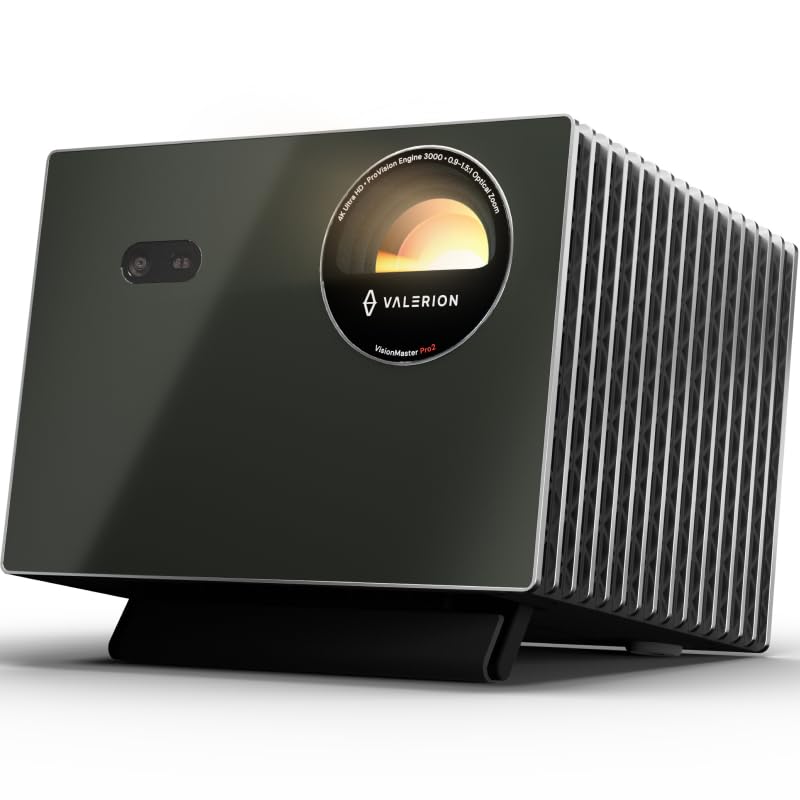
- Supports 4K UHD picture clarity.
- Includes game modes for different play styles.
- Offers 4 ms input lag and a 240 Hz refresh rate on ultra-wide 21:9 or 32:9 screens.
Best Gift For: A gamer who wants a large-screen setup for both games and movie nights.
1. Start With How They Play | gifts for gamers
When choosing gifts for gamers, start with the recipient’s routine. A player who spends most evenings at a PC may appreciate a control or audio upgrade, while someone who gathers friends for shared entertainment might enjoy a change to the room setup.
Think about what they use every session and what feels awkward today. Do they want more control at the keyboard, clearer communication while streaming, or a less crowded desk?
A gift that answers one familiar need often fits better than a surprise aimed at a hobby they rarely pursue.
For console and PC players, platform habits matter. Check which systems they use and whether they prefer a headset, speakers, or both.
If you are unsure, a gift that complements an existing setup can feel thoughtful without asking them to rebuild it.
2. Match the Gift to the Setup
Desk space and existing equipment can shape the choice as much as play style. A monitor mount needs a suitable desk and compatible screens, and a router or speaker upgrade makes most sense when the recipient has a place and connection plan for it.
For a microphone or headset, consider whether the player streams, chats with teammates, takes calls, or mainly plays solo. A feature they will use every week is more valuable than a long list of capabilities that does not match their routine.
Before choosing a larger setup change, discreetly ask about what is already connected. A monitor arm, network device, or display can depend on dimensions, ports, mounting points, or other equipment; checking those details can spare the recipient a frustrating mismatch.
3. Balance Budget and Occasion | gifts for gamers
Gifts for gamers can range from a small accessory to a major room upgrade, so let the occasion and your relationship guide the scale. A modest, useful desk addition can feel generous when it solves a daily annoyance, while a substantial shared purchase may suit a milestone or group contribution.
Set a comfortable budget first, then compare the kind of benefit each option offers. A focused upgrade can be easier to appreciate than a costly item that depends on several other changes.
For bigger purchases, consider coordinating with family or friends so the gift reflects what the recipient actually wants.
Check actual prices before buying, since they can change. If you are shopping among several options, compare the product’s role in the setup and any extra equipment the recipient may need.
A gift that works with what they already own can keep the overall cost more predictable.
4. Personalize the Setup
A practical gift can still feel personal. Match the choice to their favorite way to play, the look of their desk, or the kinds of gatherings they host.
A color or style that fits their room can make an everyday accessory feel considered without needing elaborate customization.
Presentation can add warmth even when the item is technical. Include a short note explaining why you picked it, or pair it with a small snack for a planned game night.
If the gift changes a shared space, offer to help set it up together when convenient.
For equipment with compatibility requirements, a handwritten card can make the intention clear while leaving the recipient room to confirm their setup. Keep packaging easy to open and retain receipts or gift information in case they need to check fit or exchange it.
5. Plan for Timing and Delivery
For last-minute shopping, choose something whose fit is easy to confirm and check current delivery estimates before placing the order. Avoid assuming an item will arrive by a particular date; available options and timing depend on the seller and destination.
If an exact product needs more research, a printed note about the planned gift or a contribution toward it can preserve the surprise without rushing a decision. That is especially useful when compatibility, dimensions, or existing equipment need a quick check.
Before completing the purchase, review the current product details, compatibility information, and delivery estimate. For a time-sensitive occasion, have a simple presentation ready in case the item arrives later, such as a card describing the shared gaming session or desk upgrade you have in mind.